B1-Drawbar-Organ
 # B1
**A drawbar organ for the M-VAVE FM-1.**
Classic tonewheels, nine drawbars, rotary speaker, percussion and an experimental sawtooth engine, built into a pocket-sized instrument.
[The instrument](#the-instrument) · [How to use it](#how-to-use-it) · [Effects](#effects) · [Projects](#projects) · [Installation](#installation) · [Credits](#credits) · [Changelog](/B1-Drawbar-Organ/CHANGELOG.html)
# B1
**A drawbar organ for the M-VAVE FM-1.**
Classic tonewheels, nine drawbars, rotary speaker, percussion and an experimental sawtooth engine, built into a pocket-sized instrument.
[The instrument](#the-instrument) · [How to use it](#how-to-use-it) · [Effects](#effects) · [Projects](#projects) · [Installation](#installation) · [Credits](#credits) · [Changelog](/B1-Drawbar-Organ/CHANGELOG.html)
The instrument
B1 is open-source organ firmware by SikkenWorks for the M-VAVE FM-1. Rather than playing back an organ recording, it builds the sound from tonewheel-style harmonics that you mix with drawbars while you play.
B1 has two sound engines: the original SINE / ORGAN tonewheels and an experimental SAWTOOTH mode. In either engine, choose B3 / LESLIE for the classic organ sound or ROCK / LORD for a more aggressive amplifier character. Shape the result with percussion, key click, leakage, scanner chorus/vibrato, rotary speaker, delay and reverb.
| Sound engines | SINE / ORGAN and experimental band-limited SAWTOOTH |
| Tonewheels | 91 shared, continuously running oscillators |
| Drawbars | Nine harmonic drawbars per registration |
| Organ characters | B3 / LESLIE and ROCK / LORD |
| Polyphony | Up to 12 simultaneous voices |
| Registrations | UPPER, LOWER and SOLO |
| Performance | Four keyboard ranges, chords, CHORD ATTACK, 48 scales and MIDI routing |
| Effects | Scanner chorus/vibrato, rotary speaker, delay and reverb |
| Memory | 12 named, persistent projects |
How to use it
01 / Shape the organ with drawbars
Each drawbar controls a different harmonic. Pull it out to make that part of the sound louder; push it in to remove it. The nine drawbars follow the familiar tonewheel-organ order:
| Drawbar | Harmonic character |
|---|---|
16′ |
Deep, one octave below the fundamental |
5⅓′ |
Fifth above the 8′ fundamental |
8′ |
Fundamental note |
4′ |
One octave above |
2⅔′ |
One octave and a fifth above |
2′ |
Two octaves above |
1⅗′ |
Two octaves and a major third above |
1⅓′ |
Two octaves and a fifth above |
1′ |
Three octaves above |
The drawbars use the usual 0–8 registration scale: 0 is silent and 8 is fully open. They respond smoothly to changes, including when notes are held.
B1 has three separate registrations: UPPER, LOWER and SOLO. Each has its own nine-drawbar setting. Use the organ and range pages to assign the sounds across the keyboard.
02 / Switch between ORGAN and SAWTOOTH
Hold HOME + FX together to open ENGINE MODE. The two buttons have a short recognition window, so you do not need to press them at precisely the same instant.
| Control | Action |
|---|---|
| HOME + FX | Open the ENGINE MODE screen |
| K1 left | Select SINE / ORGAN |
| K1 right | Select SAWTOOTH |
| SEL | Toggle between the two modes |
| HOME | Return to the normal drawbar screen |
SINE / ORGAN is B1’s original organ engine. SAWTOOTH changes all 91 tonewheels to frequency-appropriate, band-limited saw waves: the same drawbars, registrations, keyboard assignments and effects still apply. A short crossfade makes it possible to switch while holding notes, without abruptly restarting the tonewheels.
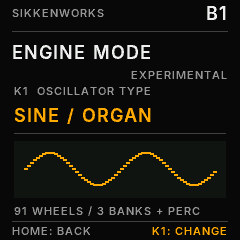
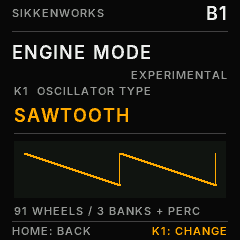
The selected mode belongs to the current project. A new project starts in SINE / ORGAN, and older projects without an engine-mode setting also open in ORGAN.
03 / Choose the character
B3 / LESLIE is the cleaner, classic organ path. Shape the sound with percussion, key click and tonewheel leakage, then add scanner chorus/vibrato and rotary-speaker movement.
ROCK / LORD sends the drawbar organ through a driven, asymmetric amplifier and a frequency-shaped guitar cabinet. Turn up AMP GAIN / DRIVE, then adjust TONE and CABINET for the speaker character. B3 / LESLIE remains available without changing projects.
Other organ controls include:
- Percussion: the second or third harmonic uses one shared, non-retriggering envelope for all held keys on UPPER. The third harmonic is enabled by default in new or reset projects.
- Key click and leakage: adjust the mechanical character of the instrument.
- Scanner chorus/vibrato: C/V modulation for classic organ movement.
- Rotary speaker: FAST and ROTOR MIX 60 by default in a new or reset project, with adjustable SLOW / FAST speeds, drum-speed relationship and blend.
For a loud, classic rock-organ starting point: choose SINE / ORGAN, UPPER drawbars 888800000, ROCK / LORD, moderately high DRIVE and AMP GAIN, and adjust CABINET and TONE to taste. Use ROTOR MIX 0 for a stationary amplifier sound, or blend in rotary movement. Key click adds attack at lower values, while leakage gives subtle generator character. These are suggested settings, not fixed presets; the parameters remain fully editable and savable.
04 / Play, split and harmonize
Use the FM-1 keys or MIDI input to play B1. Its performance controls include:
- Four keyboard ranges for routing UPPER, LOWER, SOLO and chord selection.
- CHORD ASSIGN ON/OFF: on the CHORD ASSIGN page, use K3 to enable or disable chord selector keys. With a new project, CHORD ASSIGN starts OFF. Turning it ON can create a selector zone at keys 21–27 when a suitable range slot is free.
- Assign chords: use K2 to choose a chord quality and press a physical key in the active CHORD range to assign it; K1 browses the physical key numbers.
- Chord-key LEDs (V4.0): with CHORD ASSIGN ON, every active chord selector stays steadily lit on the physical keyboard, even without holding it. Dark keys remain normal organ keys; pressing a key still lights it temporarily. This follows the actual active ranges, including overlaps, saved projects and range edits. On the SCALE page, the existing GUIDE takes priority so the 48-scale indication remains available. CHORD ASSIGN OFF shows normal LEDs.
- CHORD ATTACK: turn K4 on the CHORD ASSIGN page (or on the active CHORD-range page) to set humanized onset timing from 0 (simultaneous) to 100 (up to roughly 65 ms, with a varied note order). To audition it, hold a chord selector key and play an ORGAN-range key.
- 48 scales, with root-note, KEYLOCK and GUIDE options.
- Global octave and MIDI/range routing.
Switching CHORD ASSIGN OFF returns the keys to normal organ playing; it does not erase the saved chord assignments. Performance settings are part of the project, not a separate temporary preset.
05 / Navigate and edit
B1 uses the FM-1’s screen, rotary controls and buttons. Open a parameter page, then use its labelled knobs to change the values shown on screen.
For the effects pages, K1–K4 correspond to the parameters listed below. In the project loader, turn K1 or SELECT to choose a slot and press the physical SEL button (second button from the left in the upper row) to load it.
Effects
B1 combines the organ’s built-in modulation with separate delay and reverb pages.
Rotary speaker and scanner
The rotary effect provides SLOW / FAST motion, adjustable rotor speeds, drum-speed balance and a ROTOR MIX setting (60 in new projects). Scanner chorus/vibrato adds a separate modulation character. Both can be used to give sustained notes movement.
FX 5/6 · Delay
| Control | Parameter | Range |
|---|---|---|
| K1 | MIX | 0–100 |
| K2 | TIME | 0–100 (approximately 32–350 ms) |
| K3 | FEEDBACK | 0–90 |
| K4 | STEREO | 0–100 |
FX 6/6 · Reverb
| Control | Parameter | Choices / range |
|---|---|---|
| K1 | TYPE | OFF, SPRING, ROOM, HALL, CATHEDRAL |
| K2 | MIX | 0–100 |
| K3 | DECAY | 0–100 |
| K4 | DAMP | 0–100 |
Delay and reverb can continue to ring out briefly after you release the keys. With the effects off, a dry registration returns to silence.
Projects
B1 stores 12 named projects in persistent memory. A project holds the complete organ setup, including:
- All nine drawbars for UPPER, LOWER and SOLO.
- Keyboard ranges, chord assignments and chord attack.
- Scale, root, KEYLOCK, GUIDE and global octave.
- Percussion, key click, leakage, amplifier and organ bank.
- Rotary and scanner settings, delay and reverb.
- ENGINE MODE: SINE / ORGAN or SAWTOOTH.
To load a project, open the project loader, choose a slot with K1 or SELECT, then press SEL. A successful operation shows PROJECT LOADED on screen. Saving uses the project’s save function and confirms with PROJECT SAVED.
Automatic parameter saving (V4.9)
B1 also automatically remembers the last live sound separately from your twelve named projects. This includes all drawbars, three registrations, ranges and chord assignments, scale, organ/SAW engine, Leslie, percussion, amp, delay and reverb settings. The last autosaved sound is restored when B1 boots normally, without recalling a named project.
Autosave waits for 5 seconds after the last control edit and for all voices and FX tails to become fully silent. Flash writes are rate-limited to one attempt per minute during ongoing editing to limit flash wear. No flash is written while keys are held, effects are ringing, OTA is active, or the FM1 is in REC recovery. AUTO SAVED briefly appears on the project page when the new snapshot is committed. Continue to use named projects for deliberate, separately stored patches.
Autosave shares B1’s existing CRC-protected two-sector project journal, and uses no new or unverified flash sectors. If those two safe sectors are unavailable, B1 will not auto-save rather than overwrite another firmware’s data. Do not switch power off immediately after editing: a pending save cannot complete until the instrument becomes silent. Older B1 project journals are read and migrated automatically on the next valid save.
Existing saved projects keep their stored settings. New or reset projects start in ORGAN, with percussion ON (3rd harmonic), rotor FAST and ROTOR MIX 60. Legacy project files without an engine-mode flag select ORGAN automatically.
Firmware identity and switching
B1 identifies itself as FM-1_481026 on USB-MIDI and in its .fwsc package. This is B1’s own identity and should remain unchanged in later B1 releases. It is not the BEETLE identity and is separate from the temporary OTA-loader identity used during a firmware update.
When switching to other compatible FM1 software, use a reputable Firmware Hub or WebInstaller with SHA-256 pinned source packages. A compatible loader and valid package are required; no firmware can guarantee recovery from every foreign or interrupted flash. Back up your projects and have an independent recovery path.
Installation
The firmware is intended for the M-VAVE FM-1 and B1 has been installed and tested on real FM-1 hardware, including booting and sound output. The repository contains a native-built .fwsc update package and a browser-based installer. Rebuild both together with JIELI_TOOLCHAIN=/path/to/jieli-linux-toolchains-20250324.1 python3 tools/build_v49_release.py. Cross-firmware OTA switching and recovery have not been verified for every third-party firmware.
| File / directory | Purpose |
|---|---|
B1-WebInstaller.html |
WebMIDI-based installer for a supported browser and compatible device |
build/SikkenWorks-B1-V4.9.fwsc |
B1 V4.9 native firmware (FM-1_481026), built with the pi32v2 compiler |
build/BEETLE-RC1.01-RESTORE-ORIGINAL.fwsc |
Original BEETLE reference package, included for recovery planning |
build/B1.elf and build/B1-app.bin |
Actual native pi32v2 linked ELF and flattened application image |
firmware/ |
Full C firmware source and platform integration |
tools/ and tests/ |
Build and verification utilities |
ui-captures/ |
Native 240 × 240 UI captures, including ORGAN and SAWTOOTH mode screens |
audio-reference/ |
Software-rendered audio examples |
Use Chrome or Edge with WebMIDI and follow the WebInstaller’s device and firmware checks. The installer can validate compatible FM-1 .fwsc files that match B1’s protected BEETLE boot-header and loader requirements. For a different firmware layout, ENTER UBOOT requests a handoff to the FM-1’s independent update environment; the target firmware must then be installed with its own compatible installer. Neither path is a universal flasher.
Before installing: back up your projects and keep an independent, tested recovery method. B1 has been tested on a physical M-VAVE FM-1, including firmware installation, startup and audio playback. This does not mean that switching to every other FM1 firmware, or recovering from an interrupted update, has been proven on hardware. Do not keep retrying a failed update, bypass the loader checks, or assume the included BEETLE reference is a universal recovery image.
Credits
B1 is developed by SikkenWorks.
B1 incorporates platform work from Felucca, developed by Leo Kuroshita / Hügelton Instruments and contributors. The applicable hardware abstraction, USB/OTA integration and associated files retain their original copyright notices.
B1 is released under GPL-3.0-only. The included Inter font is subject to its own SIL Open Font License 1.1 (firmware/third_party/INTER-OFL-1.1.txt). See CREDITS.md and the accompanying license texts for the complete attribution and terms.